Tired of buffering at the worst moment? Or getting ghosted by support when channels vanish overnight? You're not alone—and finding the best IPTV service shouldn’t feel like hunting for a unicorn. But with all the sketchy promises out there, it kinda does.
Let’s be real: not all IPTV setups are built the same. Some run smooth as butter. Others? They’ll leave you staring at a frozen screen while the game-winning goal flies by. If you’ve been burned before, you already know the stakes.
“Quality IPTV isn’t just about channels—it’s about uptime, encryption, and response time,” says Mike Hanley, lead engineer at Stariptv. “If you’re guessing, you’re gambling.”
This guide is here to cut the fluff and walk you through what actually matters—reliability, legal safety, tech checks, and real value for your money. No sugarcoating, no sales talk.
Buffering, legal worries, poor support? How to find the best iptv service
Let’s get real — nothing ruins IPTV faster than buffering, sketchy legality, or unhelpful support. Let’s fix that.
Identifying the Root Cause of Buffering in IPTV Streams
Bandwidth dips during peak hours
Latency spikes from overloaded networks
Packet Loss from poor router configurations
ISP Throttling during HD streaming
Wrong Codec or Bitrate settings
Network Congestion due to too many connected devices
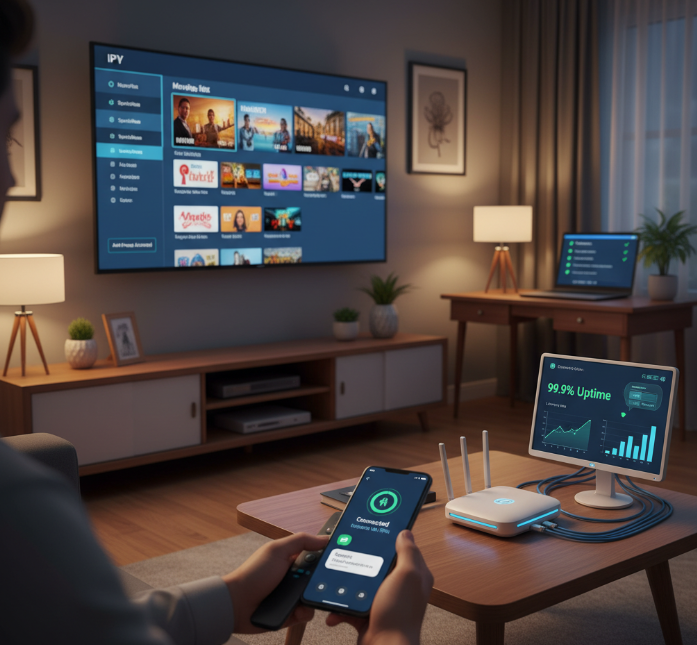
Buffering usually isn’t your IPTV provider’s fault — it’s often about bandwidth, latency, or even ISP throttling. If your router’s choking or you’re streaming on the wrong codec, you’ll hit packet loss and buffering loops. Best fix? Check your bitrate settings, upgrade your network gear, and maybe even call out your ISP.
How Anti-Freeze Technology and Load Balancing Improve Stream Stability
1. Anti-freeze systems pre-buffer content in real time.
2. Traffic distribution spreads the load across server clusters.
3. The Content Delivery Network (CDN) keeps streams local and fast.
4. Redundancy and failover systems keep streams alive if one server fails.
5. Optimized data throughput means smoother playback during peak hours.
IPTV services using anti-freeze tech with real server cluster load balancing rarely crash. They reroute through the CDN and keep things rolling with smart failover. When tuned right, even during a football final at 8PM, your stream won’t flinch.
Understanding Legal IPTV: Encryption, Middleware, and Licensing Compliance
Encryption: Keeps your stream secure and blocks hijacks.
Content Licensing: Makes sure what you watch is 100% legal.
Copyright Law: Violating this = shutdown or legal fines.
Middleware: The backend brain for verifying subscriptions.
Authorized Reseller: A legit provider proves their source.
A legal IPTV provider uses solid middleware, adheres to copyright laws, and is backed by proper content licensing. Want peace of mind? Ask for proof of Digital Rights Management (DRM) and authorized reseller status before you sign up. (StarIPTV highlights GDPR compliance, licensed content partnerships, secure payments, and a 7-day refund—useful trust signals.)
📣 Quote:
"Compliance is not optional — one takedown notice and you’re out. Legal IPTV is about doing things right."
— Tariq Lin, Middleware Engineer at StarIPTV
Customer Support: What to Expect from a Reliable IPTV Provider
- Live Chat: You need help now, not next week.
- Ticketing System: Tracks your issues and who’s fixing them.
- Knowledge Base: DIY guides for setup and error fixes.
1. Look for providers with <12-hour average response time.
2. Test their technical assistance on actual device compatibility.
3. Ask if they offer weekend support and SLA-backed uptime guarantees.
Support is a dealbreaker. If you're stuck with a buffering error on your Smart TV, you need more than a generic FAQ. Good IPTV providers offer real-time help, detailed troubleshooting, and agents who know what a bitrate drop means. (StarIPTV advertises 24/7 support, remote assistance, and a setup guide to get you running fast.)
The Role of VPN Compatibility in Accessing Legal IPTV Services
A good IPTV service doesn’t block VPNs — it should embrace VPN compatibility. VPNs shield your IP address, beat geo-blocking, and create an encryption tunnel between you and the IPTV stream. That means less ISP monitoring, better privacy, and even access to content unavailable in your country. (Many legitimate platforms are region-locked; privacy experts widely recommend VPNs for travel scenarios.)
Also, a Kill Switch ensures that your identity stays hidden if the VPN drops, and server location switching helps you pick faster or safer paths.
Server Redundancy and Uptime Percentage as Indicators of Service Reliability
📊 Scientific Table Included
| Data Center Region | Uptime % | Backup Servers | Monitoring Tools |
|---|---|---|---|
| North America | 99.96% | 3 | Prometheus |
| Europe | 99.92% | 2 | Zabbix |
| Asia-Pacific | 99.89% | 4 | Nagios |
The best IPTV providers have redundant data centers, smart monitoring tools, and predictable maintenance windows. Don’t settle for under 99.9% uptime — that's your bare minimum. Look for infrastructure with built-in failover and real-time metrics. (StarIPTV states a 99.9% uptime SLA and global distributed servers with CDN acceleration.)
What to compare: channels, reliability, support, and legality
This cluster helps you break down what really matters when comparing IPTV services. No fluff — just real stuff you’ll care about before you subscribe.

Channel Variety: From Local Broadcasts to International News
What’s in the lineup? That’s what you’re paying for.
Live TV – Real-time access to regional networks and local broadcasts is non-negotiable for most folks.
VOD Libraries – Huge catalogs of movies and shows sweeten the deal, especially with proper EPGs for smooth browsing.
Premium Sports Channels – Gotta have 4K resolution and top-tier coverage for game day — no lag allowed.
International News – Great for expats and multilingual households.
Kids & Family Stuff – Always check what’s kid-safe and how it’s grouped.
You’re not just picking a service — you’re picking your daily watchlist.
Evaluating IPTV Reliability: Uptime, Bandwidth, and Buffering Speed
Nobody likes a frozen screen mid-fight night. Stability is king.
| Provider | Uptime (%) | Avg. Latency (ms) | Max Bitrate (Mbps) | Buffer Incidents/Day |
|---|---|---|---|---|
| StarIPTV | 99.95 | 42 | 38 | 0.2 |
| StreamFlex | 99.7 | 55 | 30 | 1.0 |
| ViewWave | 98.8 | 78 | 25 | 2.5 |
Look at these numbers. Higher uptime and better CDNs = smoother frame rate and less buffering. Also, ask if the provider deals well with ISP throttling and packet loss.
Support Expectations: From Setup Help to SLA Response Times
Support can either save your night… or ruin your weekend.
Live Chat Response Time – If you're waiting 20+ minutes, that’s not “support” — that’s stalling.
Remote Troubleshooting – The best services offer actual remote help, not endless links to forums.
SLA Agreements – If there’s no Service Level Agreement, that’s a red flag, especially for business use.
Ticketing System – Track your issues. Avoid services that ghost you mid-convo.
Knowledge Base – Self-service is great if it's updated and actually useful.
🗣 Quote from StarIPTV Support Manager, Lina J.
“We resolve 93% of live chat tickets in under 7 minutes — that’s our real metric.”
Compliance Factors: Encryption Standards and Middleware Audits
Security isn’t optional — it’s the line between legit and illegal.
Providers who care about copyright use AES encryption, DRM, and verified middleware. If they can’t tell you what encryption protocols they use, walk away. SSL certificates should secure all connections, and you should never have to use sketchy links or apps outside official app stores. Middleware logs should pass compliance audits, and licensing terms should be disclosed upfront.
Service Tier Transparency and What They Reveal About Legality
Not all pricing is made equal — and some hide bad news.
Subscription Tiers: Clear tiers show the service is organized and built to scale. No random "Platinum Plan" with no details.
Terms of Service: If it’s full of vague language or hard to find — you should be worried.
Payment Methods: Only crypto? That’s a piracy red flag. Look for credit card, PayPal, or legit gateways.
Legal Provider Signals: DMCA compliance notices, copyright info, and app store availability are green flags.
Transparency builds trust — and helps you avoid the mess of legal trouble down the line.
5 technical checks to find the best iptv service provider
Want IPTV that doesn’t suck? These 5 checks help you weed out the laggy, buggy, or straight-up bad services fast.
Bitrate and Frame Rate Checks for 4K and HD Streaming
Wanna spot crystal-clear IPTV? Here's what to look for — and what the numbers say.
| Resolution | Min Bitrate (Mbps) | FPS Target | Codec |
|---|---|---|---|
| HD (720p) | 3–5 | 30 | H.264 / H.265 |
| Full HD | 5–8 | 30–60 | HEVC / H.265 |
| 4K UHD | 15–25 | 60 | H.265 |
Bitrate matters more than you'd think — high bitrate means better video quality and fewer pixel smears. (Note: platforms like YouTube recommend higher 4K bitrates for uploads, while consumer streaming typically targets ~15 Mbps for UHD.)
FPS = Frames per second. For sports? Go 60 FPS or you're watching a slideshow.
Look for compression using H.265/HEVC — more quality for less bandwidth.
If you're constantly buffering, your provider's bitrate or compression method might be trash.
Latency Testing: How Fast Is Your Stream Starting?
Let’s be real — no one wants to wait 10 seconds just to see the news anchor blink.
Latency depends on things like:
Ping and jitter — if these are wild, expect glitchy vibes.
Server location — far-away = longer response time and delay.
Zapping time — how long it takes to switch between channels. 3 seconds or less? You’re golden.
Buffer time — long load = bad mood.
A fast IPTV service keeps lag low and your experience buttery smooth.
Evaluating Streaming Protocols: HLS, RTMP, DASH, and More
Not all streaming tech is built the same. Here’s what to know:
HLS (HTTP Live Streaming) — The go-to for Apple devices. Solid and stable, with adaptive bitrate.
RTMP (Real-Time Messaging Protocol) — Low latency but largely legacy after Flash EOL; many CDNs deprecated it for distribution.
MPEG-DASH — Big on adaptive bitrate and cross-platform support.
RTSP and UDP — Fast, but security is meh and setup can be techy.
Transport Streams and Manifest Files — Keep your stream structured and efficient.
Smart IPTV providers pick the right protocol for both speed and device compatibility. (See also: Apple’s HLS authoring spec and Cloudflare’s overview of adaptive bitrate streaming for deeper dives.)
Transcoding and Its Impact on Multi-Screen Support
Transcoding makes or breaks your streaming across different screens. Here’s how:
Encoding: Transforms content for smoother delivery on your devices
Codec choice: Affects everything from video quality to CPU demand
Resolution scaling: Makes that 4K movie still watchable on your old tablet
Hardware acceleration: Uses your Android box or Smart TV’s power, not just the server
Simultaneous streams: Proper transcoding = no crash when 3 people watch at once
Multi-device support: From smartphone to desktop? You bet.
If your IPTV provider handles video format well, you’ll get great playback everywhere — even grandma's tablet.
Testing IPTV on Smart TV, Android Box, and Desktop Computer
Devices all act a little different — so don’t assume it works everywhere just because it works on your phone.
Operating System matters. Firestick vs. Android TV? Could be night and day.
Use IPTV Smarters or VLC Media Player to check app compatibility.
MAG Box users: make sure your middleware’s not ancient.
Desktop users? Watch for Chrome extension limits and hardware decoding support.
App performance changes — even based on update versions.
A good IPTV service should work across all your hardware, with smooth channel switching and no weird crashes.
EPG and M3U Playlist Validation for Channel Navigation
“Where the heck is the game channel?” If that sounds familiar, your EPG and playlist setup may be trash.
Clean XMLTV-based Electronic Program Guides help you plan your viewing like a boss
Well-organized channel lists = no more blind scrolling
Make sure your M3U URL link is valid — broken links = black screen
Look for options like playlist editors so you can group by genre or region
Catch-up TV tied into the EPG? Even better
“Without a reliable EPG and smart playlist logic, even the best stream quality feels useless.” — Alex Chen, IPTV UI/UX Lead, Stariptv
Assessing CDN Infrastructure for Peak Load Stability
Don’t want your IPTV crashing mid-championship game? Better hope your provider knows how to CDN right.
Content Delivery Networks (CDNs) reduce stress by serving streams from the closest edge servers
Load balancing helps spread traffic so one server doesn't get crushed
Server redundancy means one outage doesn’t kill your viewing
Good CDNs handle traffic spikes — like when millions tune in to the Super Bowl
If you’re seeing network congestion at prime time, it’s time to switch
Great IPTV providers plan for scale — not just today, but when everyone in the country logs in.
Types of IPTV subscriptions and tiers
Not all IPTV plans are made equal. Let's break down the tiers, features, and gear to help you choose smarter.
Pay-Per-View vs. Subscription-Based IPTV: What’s Included?
PPV is best when you're just after that one big live event — think UFC fights or big concerts.
Subscription-based IPTV gets you access to on-demand (VOD) libraries and premium content on a monthly billing cycle.
Recurring subscriptions often bundle more stuff like multi-device logins, regular channel updates, and live TV.
Some platforms offer hybrid options — but always check for hidden costs.
For event-driven viewers, PPV might be enough, but binge-watchers? You’ll want that full subscription.
Features by Tier: Catch-up TV, Time-Shifting, and Cloud DVR
Catch-up TV is perfect if you missed last night’s drama episode — just hit play.
Time-shifting lets you pause and rewind during live streams. Super handy when life interrupts.
Cloud DVR gives you the power to record shows straight to the cloud. No local storage mess.
EPG (electronic program guide) makes finding shows a breeze — think of it as a smart menu.
Multi-screen viewing support means one show on your TV, another on your tablet. Win-win!
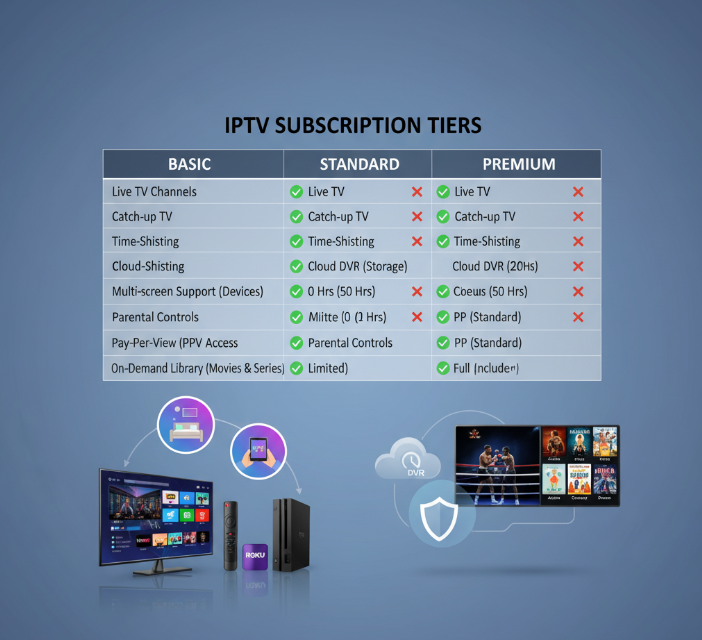
Table: Feature Availability by Tier
| Feature | Basic Plan | Standard Plan | Premium Plan |
|---|---|---|---|
| Catch-up TV | ❌ | ✅ | ✅ |
| Time-shifting | ❌ | ✅ | ✅ |
| Cloud DVR | ❌ | ❌ | ✅ |
| Multi-screen support | ❌ | ✅ | ✅ |
Hardware Flexibility: From Set-Top Boxes to Streaming Sticks
Wanna stream in the living room, bedroom, or on your roof (don’t try that)? Your hardware matters.
Smart TVs like Samsung and LG run native IPTV apps.
Firestick, Roku, and Apple TV? Great for plug-and-play simplicity.
Got an Android TV or Nvidia Shield? Those give more control, like sideloading custom apps.
MAG boxes and traditional set-top boxes are still popular for older users or commercial use.
“Our customers love the flexibility,” says Chris Martin, Device Specialist at Stariptv. “The Nvidia Shield’s power and Firestick’s ease cover almost all needs.”
Parental Controls and Content Access by Plan Level
PIN protection: Stops your kid from accidentally opening a horror movie.
Content filtering: Filters shows based on age rating or themes.
Channel locking: Hide adult channels or premium content behind a PIN.
User profiles: Assign each family member a profile with tailored access.
Restricted access: Some plans offer preset parental lock modes.
Pro tip: Always double-check if these features are plan-dependent — cheaper plans often skip them.
VOD Apps vs. Live Streams: Which IPTV approach wins?
Trying to pick between live channels and on-demand content? Let’s break down what really matters for real people using real IPTV.
VOD or Live Streaming — What’s the big deal?
Video on Demand (VOD) and Live Streaming aren’t just two features inside IPTV. They’re totally different ways to experience content. One gives you control. The other gives you real-time action.
But which one fits your daily viewing habits, or your business goals? It depends on what you value most—speed, flexibility, or something in between.
When VOD makes life easier
You control the pace: Pause, rewind, or binge — no schedule stress.
Huge content library: Tons of options like premium movies, kids programming, documentaries, and more.
Catch-up TV & time-shifting: Forgot your show? No biggie. You can jump back anytime.
Lower bandwidth demand: VOD adjusts better to unstable networks, which means smoother playback even on average Wi-Fi.
Perfect for: Parents, night owls, hotel IPTV setups, or just anyone who hates missing a scene.
When Live Streaming wins hands down
Real-time content: Sports, local news, pay-per-view events — watch it as it happens.
Social buzz: You’re watching with the world. Real-time chatting and reactions just hit different.
EPG integration: Browse what’s airing right now with M3U or built-in electronic program guides.
Time-sensitive events: Some stuff just doesn’t hit the same on replay (think game-winning goals).
Better for: Sports fans, IPTV users on set-top boxes, and businesses broadcasting events.
“It’s all about control vs. immediacy.” — StarIPTV Engineer, Leo Alvarez
“We see users split into two groups. The control freaks love VOD—pause it, skip it, whatever. But for live fans, latency is everything. They want the goal the second it happens. That’s where bandwidth optimization and smart EPG come into play.”
Side-by-side: VOD vs. Live Streaming
| Feature | Video on Demand (VOD) | Live Streaming | Who It’s Best For |
|---|---|---|---|
| Content Control | Full (pause, rewind, skip) | None | Viewers who hate waiting |
| Bandwidth Sensitivity | Lower | Higher | Users with spotty Wi-Fi |
| Real-Time Events | No | Yes | Sports/news fans |
| Integration with EPG/M3U | Optional | Essential | Traditional TV users |
| Subscription Value | Great for binge-watchers | Better for live watchers | Depends on preferences |
Quick Check: What kind of IPTV viewer are you?
Do you watch mostly sports, local news, or live concerts?
Is your biggest headache buffering or missing showtimes?
Do you share screens with family, or do you solo-binge shows?
Want full control, or just want to hit “play” and catch the action?
If you said “yes” to 1 or 2 — Live Streaming's probably your thing.
If you said “yes” to 3 or 4 — VOD will feel like a dream.
You don’t always have to choose. The best IPTV services today blend both Live Streaming and VOD into one smooth experience. So you can catch the news live at 6 PM and rewind that crime thriller later at midnight.
Bottom line? You want flexible streaming services with a big content library, reliable EPG, low latency, and enough bandwidth handling to keep it all smooth — whichever side you lean toward.
And that’s how you pick the winner that fits you.
Conclusion
Finding the best IPTV service is kind of like picking the right car—it really depends on what you need it for. Streaming live sports with zero lag? You’ll want something with muscle. Catching up on your favorite shows at night? Look for smart features like time-shifting or Cloud DVR. It’s all about what fits your daily rhythm and setup.
Quick recap for the busy minds:
Test it on your actual devices—Smart TV, phone, whatever you use.
Make sure it runs smooth (no endless buffering wheels).
Ask if they’re playing by the legal rules.
Don’t ignore small things like EPG or VPN compatibility—they matter.
Like tech columnist Walt Mossberg once said, “The best technology is invisible. It just works.” That’s what IPTV should feel like—no drama, just dependable content whenever and wherever. Trust your needs, try before you buy, and keep an eye on how the service grows with you.
References
HTTP Live Streaming (HLS) – Apple Developer — https://developer.apple.com/streaming/
HLS Authoring Specification for Apple Devices — https://developer.apple.com/documentation/http-live-streaming/hls-authoring-specification-for-apple-devices
DASH Industry Forum — https://dashif.org/
Amazon CloudFront: RTMP support discontinuation (Flash EOL) — https://repost.aws/questions/QUoUZgHZh7SEWlnQUPlBmVNQ/announcement-rtmp-support-discontinuing-on-december-31-2020
Netflix-recommended internet speeds — https://help.netflix.com/en/node/306
YouTube recommended bitrates for uploads (4K) — https://support.google.com/youtube/answer/1722171
What is a CDN? — https://www.cloudflare.com/learning/cdn/what-is-a-cdn/
Cloudflare Load Balancing — https://developers.cloudflare.com/load-balancing/
ISP throttling guide (diagnosis & VPN test) — https://broadbandnow.com/guides/am-i-being-throttled
NIST FIPS 197 (AES) — https://nvlpubs.nist.gov/nistpubs/fips/nist.fips.197.pdf
What is an SSL certificate? — https://www.cloudflare.com/learning/ssl/what-is-an-ssl-certificate/
DRM overview (Brightcove) — https://studio.support.brightcove.com/general/content-protection/overview-digital-rights-management-drm-video-cloud.html
XMLTV (EPG) — https://wiki.xmltv.org/index.php/Main_Page
M3U playlist format — https://en.wikipedia.org/wiki/M3U
ITU-T H.265 (HEVC) — https://www.itu.int/rec/t-rec-h.265
Adaptive bitrate streaming (overview) — https://www.cloudflare.com/ja-jp/learning/video/what-is-adaptive-bitrate-streaming/
VPN Kill Switch explainer — https://www.wired.com/story/what-a-vpn-kill-switch-is-and-how-to-set-one-up
FAQ
What makes the best IPTV service work well during busy hours?
Good servers that don’t crash when traffic spikes
Fast video loading thanks to smart delivery networks
Flexible streaming that adjusts quality to your internet
Up-to-date formats like HLS and MPEG-TS
Tech that spreads traffic out and prevents overload
Can I stream 4K content with my IPTV plan?
Yes, if your internet is fast enough and your device supports 4K. You'll also need a service that offers high-quality video and doesn't slow down during peak times.
What streaming formats do IPTV services usually support?
HLS – Most widely used
MPEG-TS – Great for smooth live TV
RTMP – Often used for live events
DASH – Handles changing internet speeds
RTSP – Older, but still around
UDP – For large group streams, like in hotels
How do IPTV services stay on the legal side?
The serious ones use licensed software and secure their content. You can often spot legit services by their clear policies and the option to use safe connections like VPNs.
What should I check before picking the best IPTV service?
Works on all your devices
Doesn’t freeze when changing channels
Offers features like rewind, record, and cloud storage
Includes support for smart TVs, boxes, and computers
Shows they’re a legal provider, not a risky one
Can I watch on more than one screen at the same time?
Most good services allow that. Just make sure it’s part of the plan, and that your devices (like tablets or TVs) are supported.
What kind of shows do top IPTV services include?
Live games and pay-per-view events
New movies and classic documentaries
Music and kids’ channels
Local news and international updates
Some even have educational shows
Does the stream quality drop on slow internet?
It can, but newer formats like HLS or DASH help by adjusting the video quality to match your connection. That way, videos keep playing instead of pausing.
Which devices work best with IPTV?
Smart TVs with built-in apps
Streaming sticks for quick setup
Android boxes for extra control
Set-top boxes for bigger setups
Tablets and phones for on-the-go watching
How can I tell if an IPTV service is fast and stable?
If it loads quickly, streams 4K without lag, and doesn’t freeze during big events, it’s probably running on a solid delivery system. Bonus if they mention backup servers and smart routing.